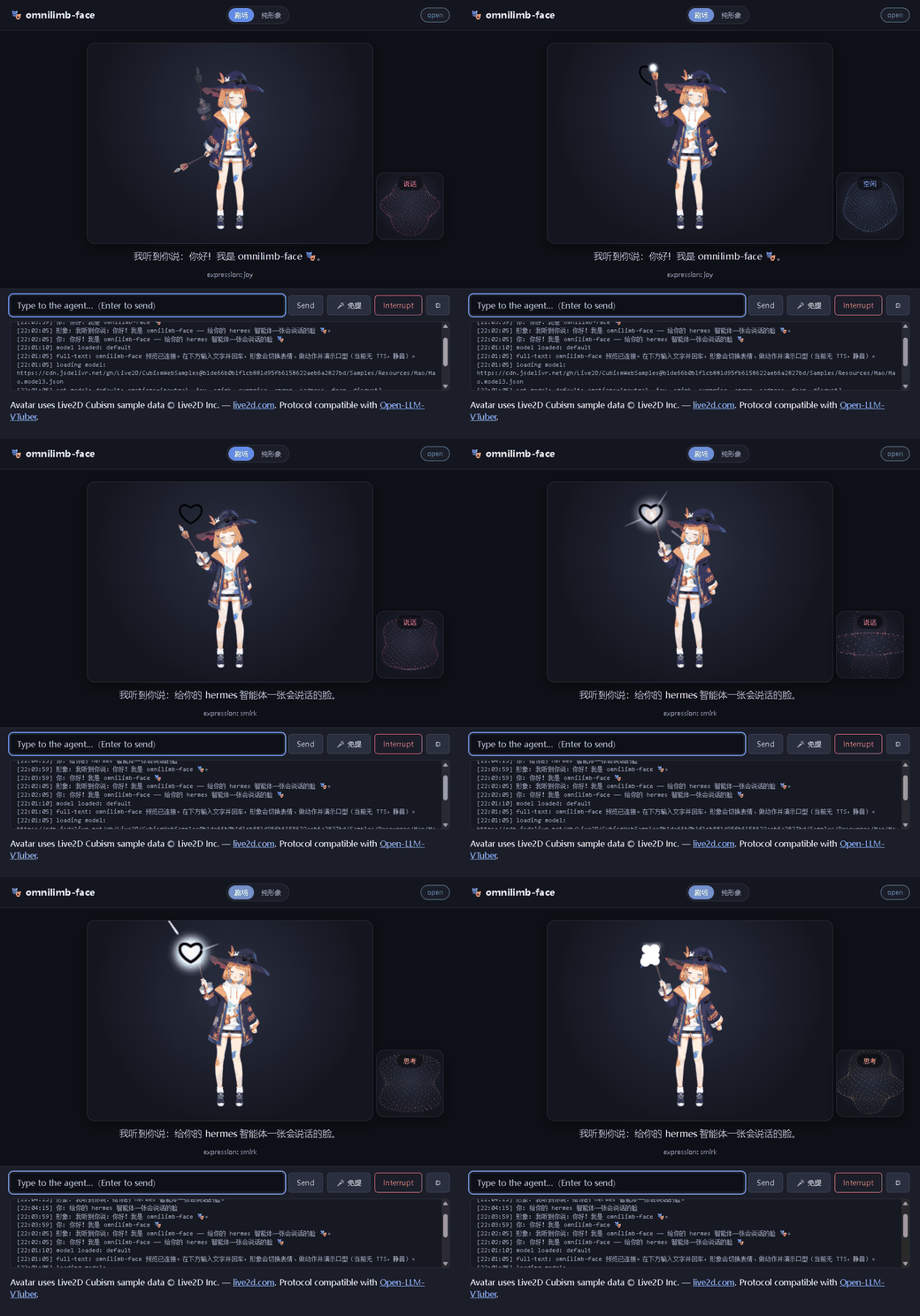
Synthetic preview. Avatar: Live2D Cubism sample "Mao" © Live2D Inc. (loaded from CDN, not bundled).合成预览。形象:Live2D Cubism 示例「Mao」© Live2D Inc.(从 CDN 加载,不打包)。
A face & voice for your hermes agent — a Live2D / Live3D VTuber plugin with hands-free voice, real-time barge-in, lip-sync and expressions.给你的 hermes 智能体一张会说话的脸 —— 带语音免提、实时打断、口型同步与表情驱动的 Live2D / Live3D 形象插件。
Synthetic preview. Avatar: Live2D Cubism sample "Mao" © Live2D Inc. (loaded from CDN, not bundled).合成预览。形象:Live2D Cubism 示例「Mao」© Live2D Inc.(从 CDN 加载,不打包)。
Talk to your agent with VAD + STT — no push-to-talk needed.VAD + STT 自动断句,免按键直接说话。
Speak while the avatar talks to interrupt it instantly.形象说话时你一开口即可立刻打断。
Switch at runtime between a 2D Cubism model and a 3D VRM model (three-vrm) — both driven by the reply audio with lip-sync and expressions.可在运行时切换 2D Cubism 模型与 3D VRM 模型(three-vrm)—— 两者都由回复音频驱动口型与表情。
Reuses your hermes model, tools and memory — it never calls an LLM itself.复用你的 hermes 模型/工具/记忆,自己从不调用 LLM。
Integrates only via register(ctx); degrades gracefully if extras are missing.仅经 register(ctx) 集成;缺少可选依赖时优雅降级。
Runs on a phone over HTTPS (self-signed cert) so the mobile mic works on the LAN.可经 HTTPS(自签证书)在手机上运行,局域网内手机麦克风可用。
A standalone, installable plugin for hermes-agent. Requires Python 3.11+. Two ways to run it:
面向 hermes-agent 的独立可安装插件。需要 Python 3.11+。两种运行方式:
A. 1-minute preview (no hermes-agent needed):
A. 一分钟预览(无需 hermes-agent):
# 1) install it (avatar renders, talks via Edge-TTS, takes typed input)
pip install omnilimb-face
# 2) start it — one command serves the page + gateway and opens the browser
omnilimb-face
# 3) open the PAGE:  http://127.0.0.1:12394/     (NOT 12393)
B. Full product — chat in hermes, the avatar speaks the real replies:
B. 完整形态 —— 在 hermes 里聊天,形象说出真实回复:
# 1) install into the hermes venv (one command, everything included)
<hermes-venv>/python -m pip install omnilimb-face
# 2) enable it: add `omnilimb-face` to plugins.enabled in ~/.hermes/config.yaml
# 3) run hermes (starts gateway 12393 + front-end 12394)
hermes
hermes vtuber status
# 4) open  http://127.0.0.1:12394/  and chat in the terminal
⚠️ The web page is on port 12394; 12393 is the WebSocket gateway (opening 12393 in a browser won't work). No sound? Edge-TTS ships in the install — just connect to the internet and click the page once. Full docs, config, CLI / slash commands, Live2D↔Live3D switching, mobile HTTPS and troubleshooting on GitHub.⚠️ 网页在 12394 端口;12393 是 WebSocket 网关(用浏览器开 12393 打不开)。没声音?Edge-TTS 语音已随安装一起装好,联网并先点一下页面即可。完整文档、配置、CLI/斜杠命令、Live2D↔Live3D 切换、手机 HTTPS 与故障排查见 GitHub。
The plugin's own code is licensed under the GNU Affero General Public License v3.0+ (AGPL-3.0-or-later): free to use, study, modify and share — but any distributed or network-deployed version must also be open-sourced under the AGPL. A separate commercial license is available for closed-source / proprietary use (contact yase19636404@163.com). Optional third-party pieces keep their own terms: the Live2D "Mao" sample is free for general users and small enterprises; edge-tts (optional) is GPL-3.0 and never bundled; openWakeWord's default models are NonCommercial. See the NOTICE.
插件自身代码以 GNU Affero 通用公共许可证 v3.0+(AGPL-3.0-or-later)发布:可自由使用、研究、修改、分享 —— 但任何分发或以网络服务部署的版本必须同样以 AGPL 开源。另提供商业授权用于闭源 / 专有产品(联系 yase19636404@163.com)。可选第三方部分另有条款:Live2D「Mao」示例对一般用户与小规模事业者免费;edge-tts(可选)为 GPL-3.0 且不打包;openWakeWord 默认模型为非商用。详见 NOTICE。